
What every number on the +1 Speed Squirrel Escape screen means
The game shows six different numbers at once and explains none of them. This is what each one is, read off the game's own interface in public gameplay footage on 5 September 2026.
Where these came from
We have not played this game. Everything on this page was read off the game's own on-screen interface in publicly posted gameplay footage, and it is tagged third-party throughout for that reason. Numbers that belong to one player's save are called out as such rather than presented as game constants. When we run the game ourselves, the figures here get replaced with measured ones and the date changes.
Speed, and the letter suffixes
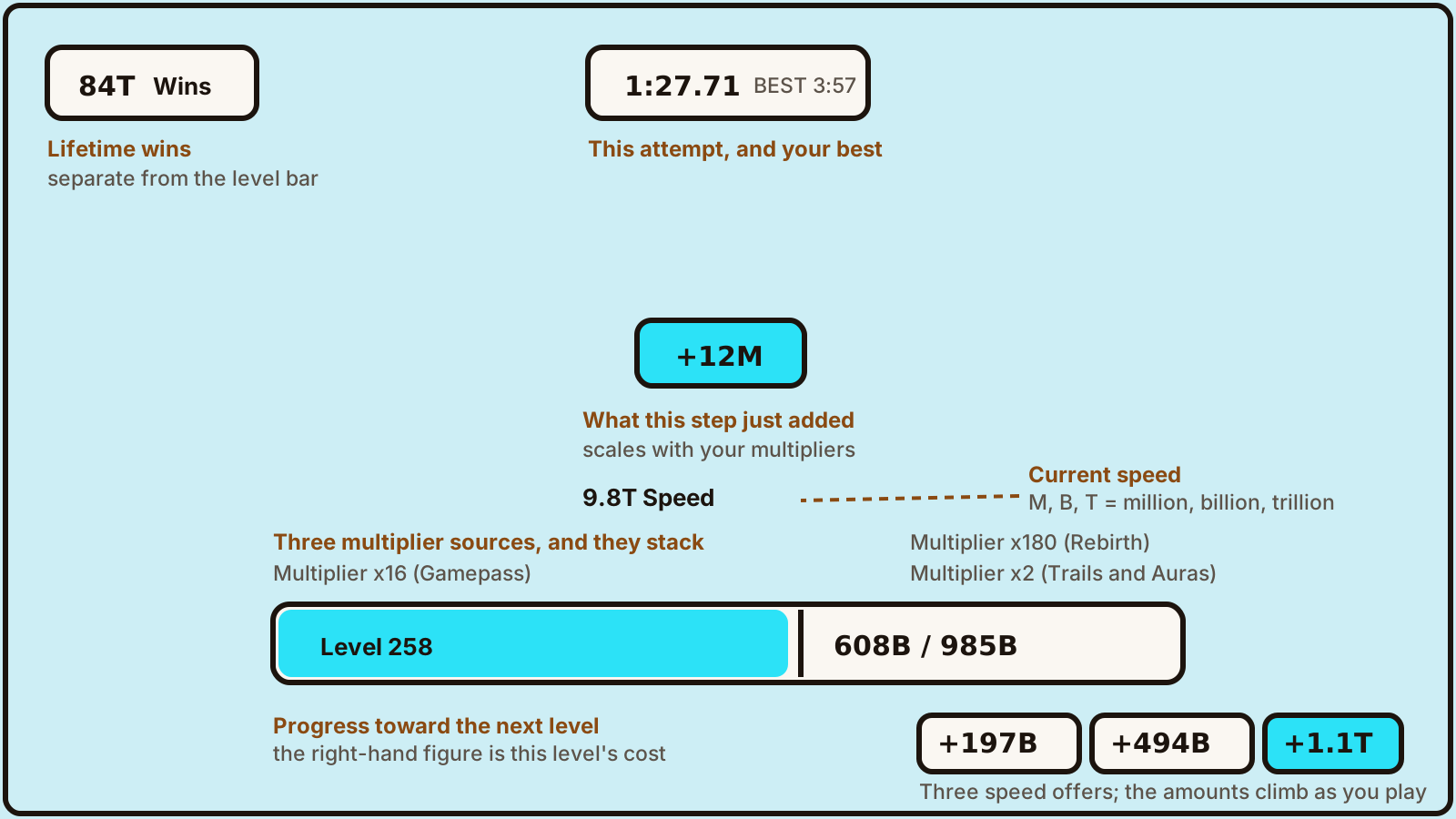
Your current speed sits in the middle of the screen above the level bar, written as a number with a letter suffix — M for million, B for billion, T for trillion. In the footage we read, speed moved from 9.8T to 9.9T over about four minutes of continuous running.
Every step you take spawns a small floating number showing what that step added. Those were +12M and +15M in the same session. The step gain is not a fixed figure: it scales with your multipliers, so a new account will not see anything close to these.
Level and the bar
The wide bar across the bottom is your level and your progress toward the next one. It reads as a current amount over a threshold. In the session we read, the player was Level 258 and the bar filled from 596B toward 985B, so 985B was the cost of that particular level.
We do not know how the threshold grows from level to level. One level's cost tells you nothing about the curve, and we are not going to extrapolate one.
The three multipliers
Small labels sit above each end of the level bar, and they name three separate multiplier sources that stack:
- Gamepass — a paid multiplier. The account we read carried ×16.
- Rebirth — the reward for resetting. That account carried ×180.
- Trails and Auras — cosmetic items that also multiply. That account carried ×2.
What rebirth actually gives you
The game labels one of its multipliers 'Rebirth' outright, which settles a question the store description leaves open: rebirthing grants a permanent multiplier rather than a one-off reward. What we still cannot tell you is what a rebirth costs or how much multiplier each one adds — the label shows a total, not a rate, and one account's total does not reveal either.
The three speed buttons
Three coloured buttons sit under the level bar, each offering an amount of Speed. In the footage they read +197B, +494B and +1.1T, and both of the smaller two ticked upward over the session — +197B became +199B and +494B became +498B within about four minutes.
That rules out fixed prices: these are offers that scale as you play. We have not seen the purchase screen, so we cannot say what currency they cost.
Wins, the timer, and the perfect bonus
Wins are a separate lifetime counter in the top-left with a trophy icon, not part of the level bar. It sat in the 83T-87T range and moved during the run, so wins accrue continuously rather than only at the end of a course.
The top of the screen carries a running clock for the current attempt alongside a personal best. Landing well triggers a bonus banner — we saw a six-times PERFECT award both currency and five Wins at once — so precision landings feed the wins counter directly.
What the screen still does not tell you
The interface never shows a rebirth price, an upgrade shop, a code entry box, or how many Worlds exist. We saw a doorway labelled World and a course element labelled Zipline, which confirms both are real, but nothing on screen counts them. Those remain open questions on this site rather than guesses.
Frequently asked
Are these numbers what I will see?
No. Every figure here belongs to one advanced account carrying a x16 gamepass multiplier, x180 from rebirths and x2 from cosmetics. A new account sees far smaller numbers. What transfers is the layout and what each field means, not the values.
Does rebirthing make my speed upgrades better?
We have no evidence that it does. The multiplier the game credits to Rebirth is a separate figure from the speed offers on the buttons, and we have not seen the two interact. We are not going to state a relationship we have not watched happen.
What do the letters after the numbers mean?
They are magnitude suffixes: M is million, B is billion, T is trillion. We have seen those three on screen. Whether this game continues past T, and with which letters, we have not confirmed.